← everything

2014

5 entries — 2 posts, 3 notes

Tools & Utilities
Open Comment

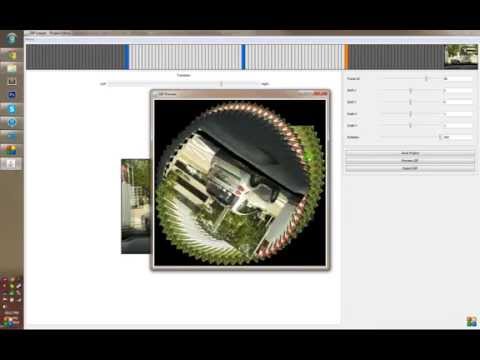
I made this tool to aid in creating perfectly looped and stabilized GIFs. From time to time I’ll take a video with my phone hoping that someday I’d turn it into a GIF and make it a perfect loop. I made this little app to avoid the manual task of shifting frame by frame so things lined up, and solved it by letting the user define “animation anchors” - the app interpolates from anchor to anchor to create smoother loops.

I originally made it for personal use so it’s not polished and there are some quirks. Let me know if you like the idea and maybe I’ll clean it up some more or add more features.

Source on GitHub

Originally posted to /r/perfectloops. I had a handful of sample before/after GIFs (Gears #1 and #2) hosted on Gfycat, which has since shut down - so those links are dead.

Demo

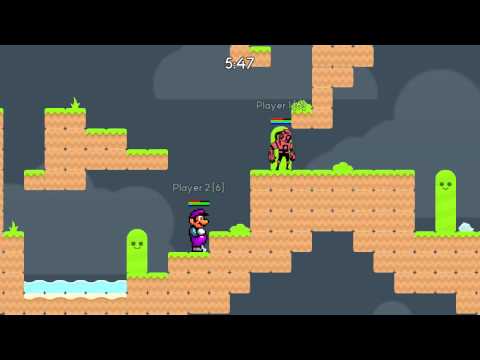
GIFLooper Demo

Procedural Cave Generation

What’s better than procedural generation with an organic twist?
Procedural Cave Generation Banner Image

In one of my previous posts I used a method to generate random dungeons based on graphs. In my implementation the rooms were rectangles, connected by hallways that would turn at 90 degrees - perfect for a dungeon. But caves have a different set of requirements:

  • Cave passages need to be fluid and have curves.
  • Cave walls need to be rugged, not confined to the 90 degree X and Y grid.
  • Cave passages need to have dynamic widths: some larger, some smaller.
  • Caves need larger areas, “caverns”.

With these requirements in mind, I thought that if I randomly generate points on a grid and connected them with a Relative Neighborhood Graph I could somehow morph the edges to create the curves and more “natural” walls.

To start, I generated the random points. The process is pretty straightforward - I have a predefined area within which I want the cave (defined by a width, height, and some padding).

int x, y;
for (int pointId = 0; pointId < _pointCount; pointId++) {
    x = _random.nextInt(_width - _padding * 2) + _padding;
    y = _random.nextInt(_height - _padding * 2) + _padding;
    _points[pointId] = new Point(x, y);
}
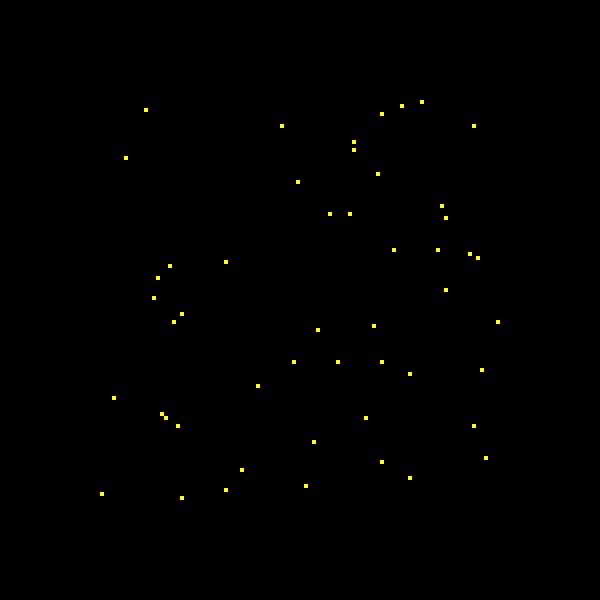
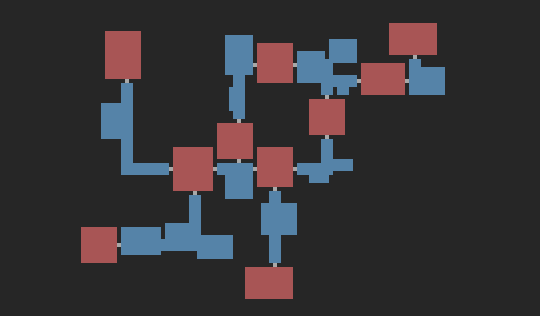
random points

Then I connected them with lines as an RNG graph. In short, it’s an undirected graph where you connect any two points (a, b) where there isn’t a third point (c) that is closer to both (a) and (b) than (a) and (b) are to each other.

Point a, b, c; // the three points
float abDist, acDist, bcDist; // the distances we care about (stored as a squared distance)
boolean isEdge;
for (int aid = 0; aid < _pointCount; aid++) {
    for (int bid = aid + 1; bid < _pointCount; bid++) { // for every pair of points (a and b)
        isEdge = true; // assume it's an edge
        a = _points[aid];
        b = _points[bid];
        abDist = a.squaredDistance(b);
        for (int cid = 0; cid < _pointCount; cid++) { // for all points other than a and b
            if (cid == aid || cid == bid) continue;
            c = _points[cid];
            acDist = a.squaredDistance(c);
            bcDist = b.squaredDistance(c);
            if (acDist < abDist && bcDist < abDist) { // if c is closer to b and a, then a is to b
                isEdge = false; // it's not an edge
                break; // and we can stop looking for this set of a and b
            }
        }
        if (isEdge) a.edges.add(b); // if no other point (c) is closer, make an edge!
    }
}
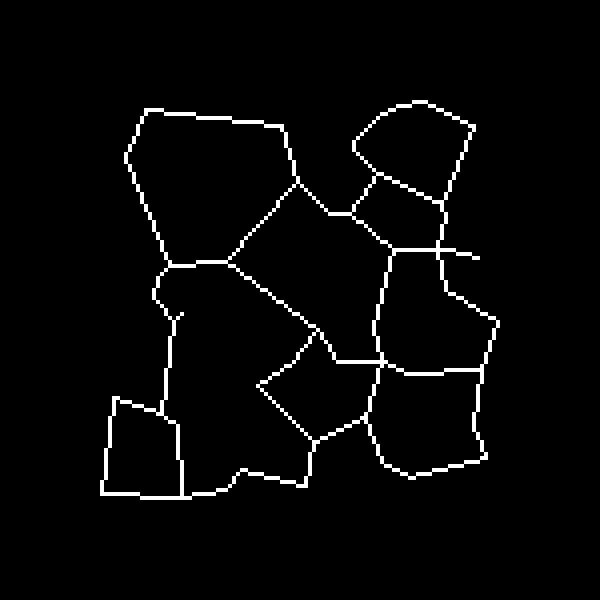
points connected via RNG

So, now I have a basis for a cave system. I’ve got loops and passage ways and it’s not confined to 90 degree turns. There’s one catch though: it’s not very natural (yet). The passage ways are a uniform width and there is no “curviness” to the walls. So I started looking around. I was focused on biologic and organic growth. I thought I could let the cave “grow.” I found Cellular Automaton; the basis of Conway’s Game of Life. From there I found a lot of great resources on the Procedural Content Generation Wiki, specifically this one by Jlund3. But it has its issues: you couldn’t control the shapes of the cave and there were chances of pockets of air that weren’t connected to each other.

I ended up coming to the conclusion that I could treat my above image like a petri dish and pretend the lines I drew of my graph were like lines of some kind of organic goop. Then after I gave it some time, the organic goop could grow and form more natural structures and pathways. From here on out the entire process is basically greyscale pixel manipulation. For the entrance and exit I drew some larger shapes to ensure they would grow to an adequate size for stairs or ladders. This was now my starting “petri dish.”
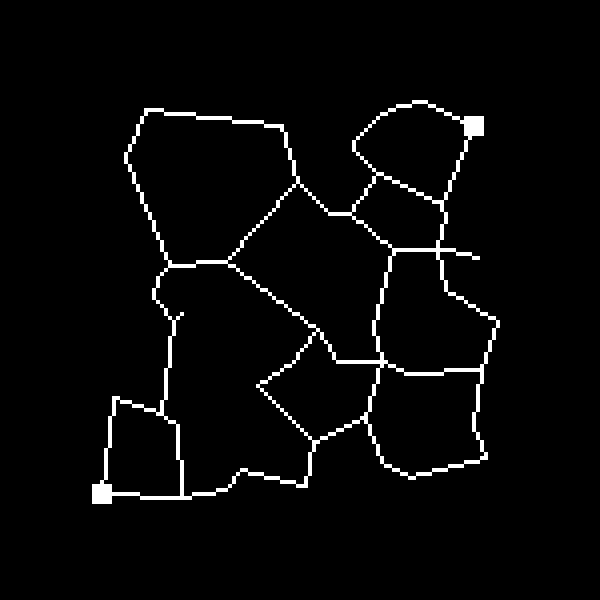
cave passages chosen

Now I needed to come up with an algorithm that would “let the pixels grow.” The basis of following algorithm is that if a pixel is “large” enough (i.e. it’s value is above a certain threshold), it will grow into other neighboring pixels.

// amount: the growth amount if a growth is to occur
// seedLimit: for every pixel, only let it grow if it meets this threshold
// chance: if a pixel meets the threshold, it should only grow into its neighbors
//         this percentage of the time
// growRadius: size of the growth area - as a square around the seed pixel.
public void grow(float amount, float seedLimit, float chance, int growthRadius) {
    // hold the pixel growth separate from the map while we calculate the growth
    float[][] growth = new float[_height][_width];
    int tx, ty;
    for (int y = 0; y < _height; y++) {
        for (int x = 0; x < _width; x++) { // for each pixel
            if (_map[y][x] >= seedLimit) { // if this pixel meets the threshold - it's a seed!
                // loop through all neighbors within the radius
                for (int dy = -growthRadius; dy <= growthRadius; dy++) {
                    for (int dx = -growthRadius; dx <= growthRadius; dx++) {
                        tx = x + dx;
                        ty = y + dy;
                        // don't grow outside the map boundaries
                        if (tx < 0 || ty < 0 || tx >= _width || ty >= _height) continue;
                        // double the seed pixel's amount when it grows
                        else if (tx == x && ty == y) growth[y][x] = _map[y][x];
                        // roll the dice, if it meets the chance, grow that neighbor
                        else if (_random.nextFloat() <= chance) growth[ty][tx] += amount; //\_map[y][x];*
                    }
                }
            }
        }
    }
    // apply the accumulated growths to the map itself
    for (int y = 0; y < _height; y++)
        for (int x = 0; x < _width; x++)
            _map[y][x] = clamp(_map[y][x] + growth[y][x]);
}

We’ll want to run this growth algorithm a couple times (come on, bacteria doesn’t grow in 10 seconds flat). To make that a little easier we can create a little helper method:

public void growMultiple(int count, float amount, float seedLimit, float chance, int growthRadius) {
    for (int run = 0; run < count; run++)
        grow(amount, seedLimit, chance, growthRadius);
}

We can then use this method to grow our cave system. This is the trickiest part; seemingly small changes to the parameters can create huge changes in the output. Play around with different growth amounts, chances, radii, etc. You can create big, wide smooth caves; or cramped jagged caves pretty easily. I found the following to create a pretty decent “cave” looking result.

oc.growMultiple(8, 1f, 1f, 0.05f, 1);
oc.growMultiple(1, 0.3333f, 1f, 0.5f, 1);
oc.growMultiple(3, 0.05f, 0.5f, 1f, 1);

growing the cave organically

Awesome, this looks good. However, tiles don’t really work with “gradient” or “blurred” edges, so we need to pass it through a simple contrast filter to make the edges sharp and tile-worthy.

public void contrast(float threshold) {
    for(int y = 0;y < _height;y++) {
        for(int x = 0;x < _width;x++) { // for each pixel
            // if it's above the threshold, set it to 1, otherwise, 0
            _map[y][x] = _map[y][x] >= threshold ? 1 : 0;
        }
    }
}

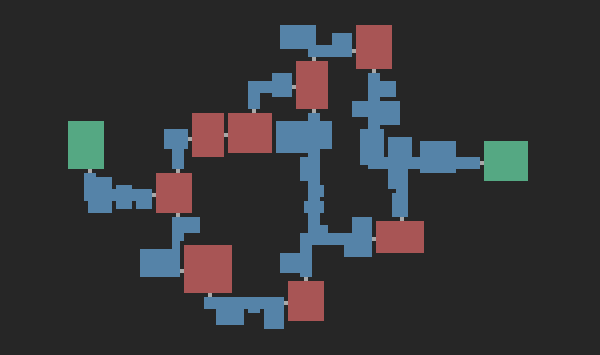
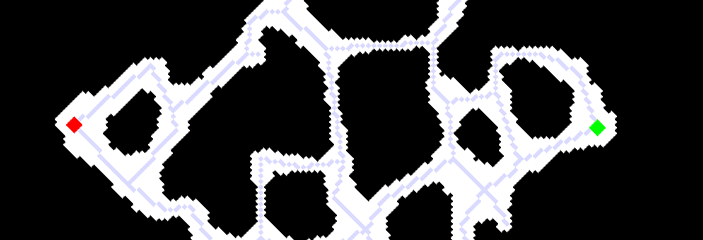
And that’s it. It’s ready to be converted into a tile map. Here’s a sample result, I’ve drawn over the start and end areas (green and red boxes) as well as the underlying graph so you could easily see the extent of the growth:
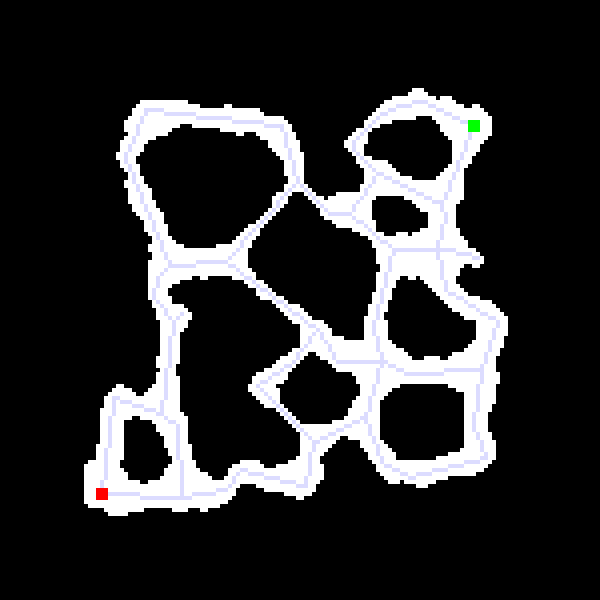
end result

You can find the full source code here.
Dungeon Generation

I delve in the world of ‘Procedurally Generated’ map generation.

Dungeon Generation Banner Image

In all of my (unfinished) games, a lot of time is taken up with content generation. This includes art, story, skills/combat ideas, map creation and countless other tasks. One of the things that I’ve always been intrigued by is procedurally generated maps and textures. They offer decent, controlled layouts that can be generated on the fly. So recently, I set out to take a stab at it. I think it’s a good start to a real rogue like dungeon generator; here’s how it went.

Before we get started, here’s a sample of the end-result. I am really happy with it and plan to eventually generate a tiled map given a tile set.

Sample end result

I stumbled upon this post on Reddit pretty quickly after searching for “procedural dungeon generation” on Google, Procedural Dungeon Generation Algorithm Explained by phidinh6. The post outlines a pretty straight-forward approach to generate random rooms that do not intersect, and then connects them with hallways based on a connected graph. He easily lays it out and gives a nice demo that really helped me visualize the whole process, here.

There were a couple steps that were easier said than done. The first being step 3; specifically “simple separation steering behavior to separate out all of the rectangles.” I couldn’t find anything on the internet that was directly related, but I was able to create something based on what I could see in his demo. The basic idea is to loop through each pair of rooms and shift both the least amount possible to get rid of any overlap. Keep doing so until no rooms overlap. Here’s some commented code to do this step:

// a Room is a simple rectangle (x, y, width, height)
private static void separateRooms() {
  Room a, b; // to hold any two rooms that are overlapping
  int dx, dxa, dxb, dy, dya, dyb; // holds delta values of the overlap
  boolean touching; // a boolean flag to keep track of touching rooms
  do {
    touching = false;
    for (int i = 0; i < rooms.size(); i++) {
      a = rooms.get(i);
      for (int j = i+1; j < rooms.size(); j++) { // for each pair of rooms (notice i+1)
        b = rooms.get(j);
        if (a.touches(b, padding)) { // if the two rooms touch (allowed to overlap by 1\)
          touching = true; // update the touching flag so the loop iterates again
          // find the two smallest deltas required to stop the overlap
          dx = Math.min(a.getRight()-b.getLeft()+padding, a.getLeft()-b.getRight()-padding);
          dy = Math.min(a.getBottom()-b.getTop()+padding, a.getTop()-b.getBottom()-padding);
          // only keep the smaller delta
          if (Math.abs(dx) < Math.abs(dy)) dy = 0;
          else dx = 0;
          // create a delta for each rectangle as half the whole delta.
          dxa = -dx/2;
          dxb = dx+dxa;
          // same for y
          dya = -dy/2;
          dyb = dy+dya;
          // shift both rectangles
          a.shift(dxa, dya);
          b.shift(dxb, dyb);
        }
      }
    }
  } while (touching); // loop until no rectangles are touching
}

He opts to use a Delaunay Triangulation trimmed with a Minimal Spanning Tree to connect the bigger rooms. However, I found naughty’s suggestion to use a Relative Neighborhood Graph to be simpler and to produce better results. It created the loops to make the dungeons more complex while still minimally connecting all rooms. From Wikipedia:

“(A RNG is an) undirected graph defined … by connecting two points A and B by an edge whenever there does not exist a third point C that is closer to both A and B than they are to each other.”

Here’s my implementation:

private static void connectRooms() {
  Room a, b, c; // Rooms to check between
  double abDist, acDist, bcDist; // squared distance between each of the 3 rooms
  boolean skip;
  for(int i = 0;i < corridors.size();i++) {
    a = corridors.get(i);
    for(int j = i+1;j < corridors.size();j++) { // for each pair of rooms
      skip = false;
      b = corridors.get(j);
      // get the sqrd distance between a and b
      abDist = Math.pow(a.getCenterX()-b.getCenterX(), 2) + Math.pow(a.getCenterY()-b.getCenterY(), 2);
      for(int k = 0;k < corridors.size();k++) { // loop through all other rooms
        if(k == i || k == j) // that are not a or b
          continue;
        c = corridors.get(k);
        // get the other two applicable distances
        acDist = Math.pow(a.getCenterX()-c.getCenterX(), 2) + Math.pow(a.getCenterY()-c.getCenterY(), 2);
        bcDist = Math.pow(b.getCenterX()-c.getCenterX(), 2) + Math.pow(b.getCenterY()-c.getCenterY(), 2);
        // if the distance between a and c or b and c are smaller than a, the pairing of
        // a and b is not a graph edge
        if(acDist < abDist && bcDist < abDist)
          skip = true;
        if(skip) // so we break the loop and go to the next a and b pairing
          break;
      }
      if(!skip) { // if this a and b pairing was never skipped, it should be an edge
        if(graph.get(a) == null)
          graph.put(a, new LinkedList());
        graph.get(a).add(b);
      }
    }
  }
}

After these rooms are connected, I needed to generate the hallways required to traverse between them. I wanted the hallways to randomly bend from A to B either clockwise or counterclockwise which caused me some trouble. So much so I needed to look for help at Stack Exchange, here. Thanks to Heckle’s suggestion I was able to find a way to connect the two rooms with connected hallways. There’s a code example on the Stack Exchange page.

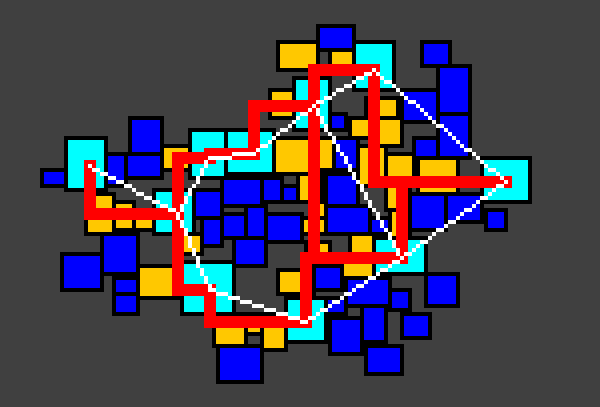
Once I was able to connect the big rooms with hallways, it’s simply a matter of drawing the rooms, smaller corridors and hallways to an image. Pixels can translate directly to tiles, so I plan to generate tile maps based on these generated images. This Image shows a (messy) more detailed result of my methods.

detailed overlay

And here’s a final result. I still need to work on the doorways from the hallways and the big rooms, but it’s a great starting point for a rogue-like map.

simple end result

You can find the full source code on my Procedural Generation GitHub.

Tools & Utilities
Open Comment

Listr was a simple app for keeping itemized lists and sharing them with other people.

The idea came from a mundane problem: Lisa and I wanted one grocery list that both of our phones could edit. Everything we tried was either too heavy or too fiddly for something that should just be a list. So I built my own. (We eventually gave up and moved to WunderList, which we loved - but by then I had already learned the thing I actually wanted to learn.)

You could register, spin up a list, and start adding items right away: check them off, archive the ones you didn’t want cluttering the view, or delete them outright. It auto-completed new items from what you’d added before, which made repeat grocery runs quick. You could add friends and share a list with them to edit together.

The reason Listr mattered to me wasn’t the feature set - it was the architecture. It was my first real attempt at a JavaScript front-end application talking to a web-service API rather than a page rendered whole by the server. The backend was a RESTful API in PHP over MySQL; the front end was served as a shell by PHP and then ran on jQuery in the browser, calling the API for everything. That split - a dumb server handing data to a smart client - is the shape of basically everything I’ve built since.

Source on GitHub