← all tags

#Work & Employment

Things that only exist because I need to work for money

2 entries

calsync: It syncs calendars

Before the COVID shut down, I really didn’t worry about accessing my work calendar while at home. I was just at work, from 9 to 5, Monday through Friday. I even left my laptop at work back then…

But now that I work remotely and have kids, organizing my time has become much trickier. Family and personal events started impacting my work day a lot more. My life is spread accross a few different calendars:

  • Personal
  • Household
  • Lisa’s (for awareness)
  • Work Meetings (work account)
  • On Call (work account)

The hard part is that they cross work/life boundaries. A kid’s dentist appointment on Household calendar doesn’t automatically block my time in my work calendar. And my wife can’t see when my meetings are when making plans that include me.

The whole thing comes down to the wall between my work life and my personal life. Work lives in one Google account, my personal and shared calendars live in another, and getting them to cooperate across that wall - without handing either side access it shouldn’t have - is the entire problem.

A few years ago, I wrote a little Google Apps Script to copy my personal appointments onto my work calendar as “busy” blocks. It worked, but it only solved half of the problem I actually have. So I wrote a second, more complex script to go the other way with slightly different features.

I made: calsync.

I want to see my work calendar without giving work my personal devices. I want my meetings on my phone, and I want Lisa to see when I’m busy so she can plan around it. There are only 2 real options, and both stink: opening up the Slack calendar app; or log into my work account on my personal phone, allowing work to enforce device policies I don’t want. I just want to know what time my next meeting is.

I want my personal life to block off my work day. Dentist appoints, haircuts, (maybe interview…) - these happen between 9 and 5, and if they only exist on my personal calendar, a coworker will book a meeting right over them if I double double-enter my events. And the calendar slot undersells the real cost. “Dentist, 2:00-2:30” ignores the drive there and back, the context switch, and the few minutes it takes catch up on whatever happened in Slack while I was gone.

Mask: show that you’re busy, without the details

The first move is the one the old script did. Take an event from a personal calendar and drop a copy onto my work calendar as an opaque block. Same time slot, but the title and notes are gone - coworkers see “Busy,” not “Dentist - Dr. Toothy.”
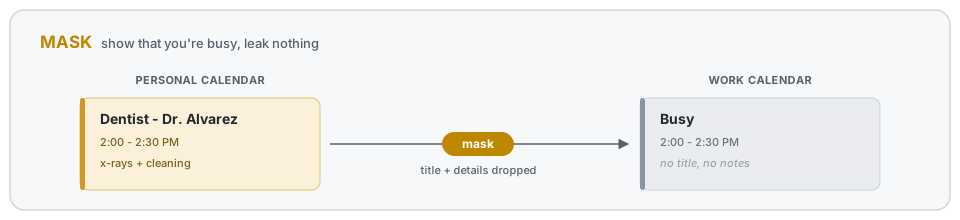
Mask: a personal event becomes an opaque "Busy" block on the work calendar

Buffer: pad the block

A 2-2:30 appointment isn’t really over at 2:30. I have to drive back home and get my head back into work. So the busy block gets padded on both ends by a buffer. The half-hour haircut becomes a wider hold on my work calendar.
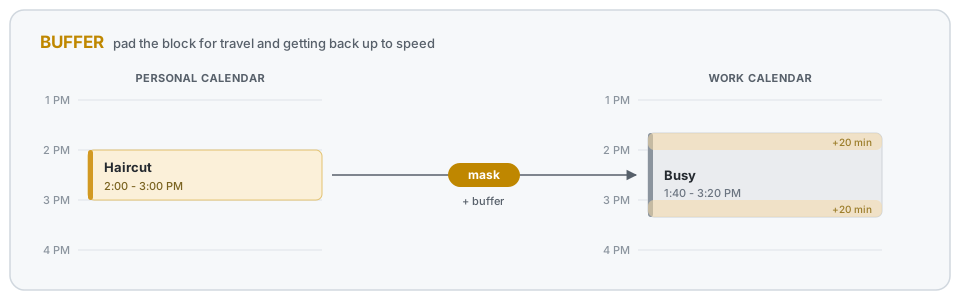
Buffer: the busy block is padded past the appointment on both ends

Mirror: see my work day on my own calendar

The other direction, and the half the old script never did. Take my work meetings and copy them onto a personal calendar - but just the title. No guest list, no attached docs, no meeting notes. Enough to see the shape of my day on my phone, with none of the work content riding along where it shouldn’t.
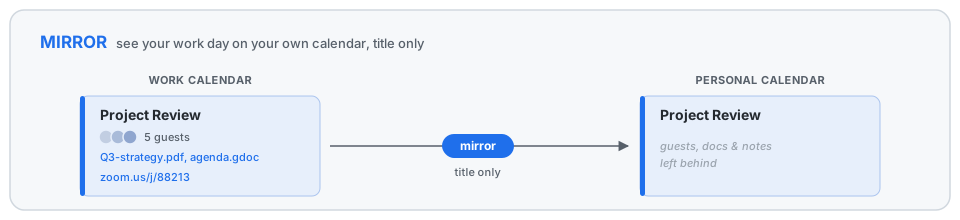
Mirror: a work meeting copied to the personal calendar as title only

This is the half that lets Lisa glance at her calendar and see I’m in a meeting from 10 to 11, without either of us logging into my work account.

Extras: carry the two things I actually reach for

The title is usually enough, but two details are worth carrying over, and each is its own switch.

The join link, for when I’m running late and need to drop into a Zoom from my phone while walking to the car - no laptop, no digging through email.

The room, for when I’m on-site and have no idea where a meeting actually is. I want to glance at my phone and see “Skyscraper, 4th floor, Room 2” not pull out my laptop to find it.
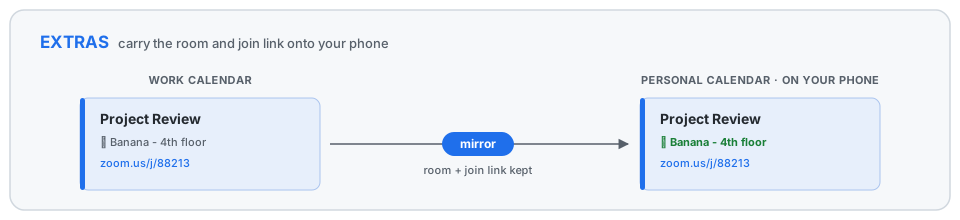
Extras: the room and join link carried onto the personal calendar

Quick setup

It’s a Google Apps Script, so there’s no server to babysit - it lives in your Google account and fires whenever a calendar changes. Setup is mostly wiring:

  1. Share the calendars you want to sync into the account the script runs as - read on the sources, write on the targets.
  2. Clone the repo, npm install, and copy the template: cp Config.example.js src/Config.js.
  3. Edit src/Config.js (below) with your calendars and rules.
  4. npx clasp login, npx clasp create --type standalone --rootDir src, then npx clasp push to send it up.
  5. In the Apps Script editor, run dryRunAll to preview, syncAll to do it for real, and setupTriggers once to keep it running on its own.

The config is the whole interface. You name your calendars once, then write rules against those names. Here’s roughly what mine looks like:

// Name the calendars once; rules reference these names.
const CALENDARS = {
  work: 'primary',                       // the account calsync runs as
  personal: '[email protected]',          // shared into the work account
  family: '[email protected]',
  phone: '[email protected]', // a calendar I read on my phone
};

function getSyncRules() {
  return [
    // Personal life -> work, as opaque "busy" blocks padded for travel.
    {
      name: 'personal_to_work',
      mode: 'mask',
      sources: ['personal', 'family'],
      target: 'work',
      maskTitle: 'Busy',
      bufferMinutes: 20,                  // a 2:00-2:30 appt holds 1:40-2:50
      color: CalendarApp.EventColor.YELLOW,
      visibility: CalendarApp.Visibility.PRIVATE,
      includeWeekends: false,
      excludeTitles: ['[free]'],          // skip personal events tagged [free]
    },

    // Work day -> a calendar I read on my phone: titles, room, and join link.
    {
      name: 'work_to_phone',
      mode: 'mirror',
      sources: ['work'],
      target: 'phone',
      copyLocation: true,                 // carry the room
      extractUrlRegex: 'company\\.zoom\\.us', // carry a matching join link
      excludeTitles: ['Busy'],            // don't mirror my own mask blocks back
    },
  ];
}

The mask rule is the one I lean on most. bufferMinutes is the travel-and-context-switch pad, maskTitle and visibility are what keep the details off my work calendar, and excludeTitles lets me opt a personal event out by tagging it [free]. Everything not set falls back to sensible defaults, so a rule only has to say what’s interesting about it.

If you want to run your own, setup and the full list of knobs are in the README.
Personal Calendar Sync

Work & Employment

In my career, I’ve mostly used Google Calendar at work. I also use multiple Google calendars for personal events (personal, shared, family, etc.). I can share these calendars with my work account, but my personal events do not show up as “Busy” to my coworkers. So I often have to invite my work account to all of my events, or manually create duplicate “Busy” events in my work calendar.

Then I found this article. Which links to this Google Apps Script. The process is exactly right, but I changed the script to support some more options.

Goal

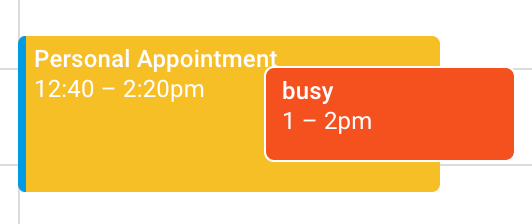
The goal is to automatically create (and delete) busy blocks in my work calendar, with some time buffer to account for travel/context switching. Here’s an example:

Example

The 1-2p event is from my personal calendar, as seen from my work account. The sync script has automatically created a 12:40-2:20p event in my work calendar blocking it off from meeting invites.

Process

This process is an abbreviated version of this article. The only difference is the mention of multi-calendar support and different parameters to change.

  1. Share your personal calendars with your work account (no need to share event details)
  2. Get the Calendar ID for each of them (you can find them in the “settings” of the calendar, by the “Share” section)
  3. Create a new Google Apps Script, and include this source code, updating the parameters as desired:
  • Set your external calendar IDs
  • Set your buffer time (20 minutes means that a 8a-9a event will create a 7:40a-9:20a block in your work calendar)
  • Update your event details visibility, color, and title
  • Configure how many days you want the script to look ahead (4 weeks by default)
  1. You can then run the script manually to sync and verify it works.
  2. Then head to the “Triggers” section of your project. For each calendar you’re syncing from, setup a new trigger to call the sync function. Source it from a calendar whenever it is updated. Use the same calendar IDs you added to your script parameters.

That’s it, all done!

Script

Here is my version of the script:

function sync() {
  var secondaryCalIds = [];
  secondaryCalIds.push("[email protected]");
  secondaryCalIds.push("[email protected]");
  var primaryEventTitle = "Personal Appointment";
  var eventBufferMinutes = 20;
  var eventBufferMs = eventBufferMinutes * 60 * 1000;
  var visiblity = CalendarApp.Visibility.PUBLIC;
  var color = CalendarApp.EventColor.YELLOW;

  var today = new Date();
  var endDate = new Date();
  endDate.setDate(today.getDate() + 28); // how many days in advance to monitor and block off time
  var secondaryEvents = [];
  for (cid in secondaryCalIds) {
    var secondaryCal = CalendarApp.getCalendarById(secondaryCalIds[cid]);
    var srcEvents = secondaryCal.getEvents(today, endDate)
    var secondaryEvents = secondaryEvents.concat(srcEvents);
    Logger.log('Number of source events: ' + srcEvents.length + ' (' + secondaryCalIds[cid] + ')');
  }

  // create filtered list of existing primary calendar events that were previously created from the secondary calendar
  var primaryCal = CalendarApp.getDefaultCalendar();
  var primaryEventsAll = primaryCal.getEvents(today, endDate); // all primary calendar events
  var primaryEvents = []; // to contain primary calendar events that were previously created from secondary calendar
  for (pev in primaryEventsAll) {
    var primaryEvent = primaryEventsAll[pev];
    if (primaryEvent.getTitle() == primaryEventTitle) {
      primaryEvents.push(primaryEvent);
    }
  }
  Logger.log('Total number of target events: ' + primaryEventsAll.length);
  Logger.log('Number of managed target events: ' + primaryEvents.length);

  // process all events in secondary calendar
  var statsCreated = 0, statsDeleted = 0;
  var updatedPrimaryEventIds = []; // to contain primary calendar events that were updated from secondary calendar
  for (sev in secondaryEvents) {
    secondaryEvent = secondaryEvents[sev];

    // include buffer around personal appoint (i.e. travel time)
    var secondaryStart = new Date(secondaryEvent.getStartTime().getTime() - eventBufferMs);
    var secondaryEnd = new Date(secondaryEvent.getEndTime().getTime() + eventBufferMs);

    // if the secondary event has already been blocked in the primary calendar, update it
    updated = false;
    for (existingId in primaryEvents) {
      var primaryEvent = primaryEvents[existingId];
      if ((primaryEvent.getStartTime().getTime() == secondaryStart.getTime()) && (primaryEvent.getEndTime().getTime() == secondaryEnd.getTime())) {
        primaryEvent.setDescription(secondaryEvent.getTitle() + '\n\n' + secondaryEvent.getDescription());
        primaryEvent.setVisibility(visiblity);
        primaryEvent.setColor(color);
        updatedPrimaryEventIds.push(primaryEvent.getId());
        Logger.log('EVENT UPDATED - id: ' + primaryEvent.getId() + ' (' + secondaryEvent.getTitle() + ')');
        updated = true;
        break;
      }
    }
    if(updated) {
      continue;
    }

    // skip all day, multi-day, or weekend events
    var startDay = secondaryEvent.getStartTime().getDay();
    var endDay = secondaryEvent.getEndTime().getDay();
    if(secondaryEvent.isAllDayEvent() /*|| startDay != endDay */|| startDay == 0 || startDay == 6) {
      continue;
    }

    // create a new event based on the secondary event
    var newEvent = primaryCal.createEvent(primaryEventTitle, secondaryStart, secondaryEnd, {description:secondaryEvent.getTitle() + '\n\n' + secondaryEvent.getDescription()});
    newEvent.setVisibility(visiblity);
    newEvent.setColor(color);
    newEvent.removeAllReminders();
    statsCreated = statsCreated + 1;
    Logger.log('EVENT CREATED - id: ' + newEvent.getId() + ' (' + secondaryEvent.getTitle() + ')');
  }

  // if a primary event previously created no longer exists in the secondary calendar, delete it
  for (pev in primaryEvents) {
    if (updatedPrimaryEventIds.indexOf(primaryEvents[pev].getId()) == -1) {
      var pevIdToDelete = primaryEvents[pev].getId();
      Logger.log(pevIdToDelete + ' deleted');
    Logger.log('EVENT DELETED - id: ' + pevIdToDelete + '');
      statsDeleted = statsDeleted + 1;
    }
  }

  Logger.log('Events created: ' + statsCreated);
  Logger.log('Events updated: ' + updatedPrimaryEventIds.length);
  Logger.log('Events deleted: ' + statsDeleted);
}